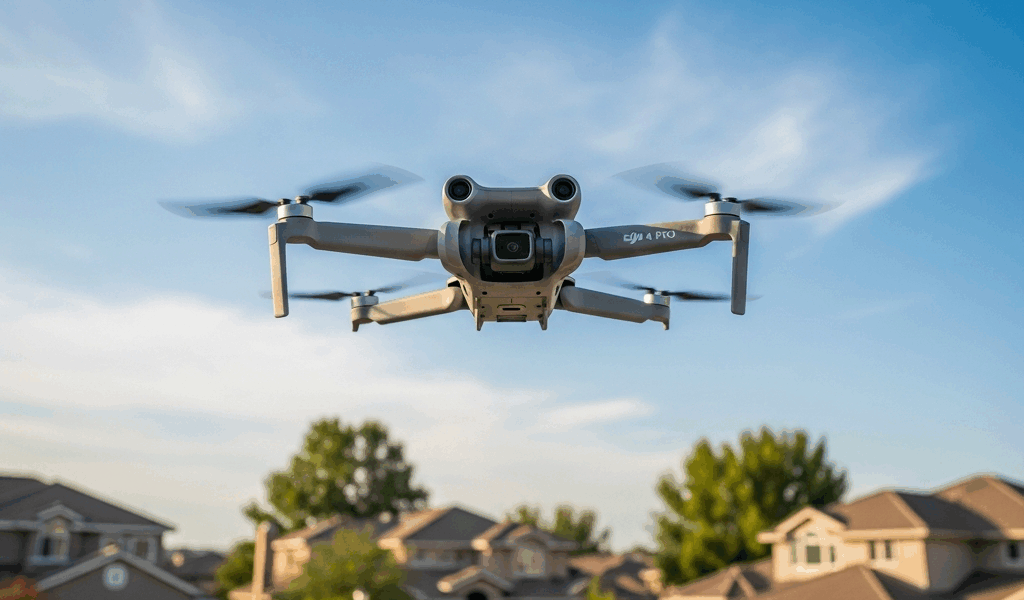
The 250g Myth You Probably Already Believe
Drone regulations have gotten complicated with all the misinformation flying around. You bought a DJI Mini 4 Pro. It weighs 249 grams. You read somewhere online that sub-250g drones can fly over people freely. That’s the first thing you got wrong.
As someone who picked up a Mini 4 Pro last year and spent the first two hours of ownership flying under completely false assumptions, I learned everything there is to know about this specific rule the hard way. Today, I will share it all with you.
The 250-gram threshold determines exactly one thing: whether you need to register your drone with the FAA. That’s it. Nothing else. It has zero bearing on whether you can legally fly over people. I caught my own mistake only after actually sitting down and reading the Part 107 text — at least I caught it before filming anything that could’ve gotten me fined.
Most people conflate registration requirements with operational rules. They’re separate things entirely. Your Mini 4 Pro skips registration because it’s under 250g, but that exemption doesn’t magically unlock over-people flight privileges. The rules for flying over people live in 14 CFR 107.110, and they’re built around risk assessment, not marketing-friendly weight numbers.
What FAA Category Actually Applies to the Mini 4 Pro
Probably should have opened with this section, honestly. But here we are.
The FAA uses four categories for small unmanned aircraft operations over people. Categories 1 through 4 each define where and how you can operate, based on design characteristics and weight limits. So, without further ado, let’s dive in.
But what is Category 1? In essence, it’s the least restrictive classification for over-people operations. But it’s much more than that — it’s the category most Mini 4 Pro owners will actually qualify under, and understanding it changes everything about how you plan your flights.
An aircraft qualifies for Category 1 if it weighs 0.55 pounds or less — roughly 249 grams — and has no exposed rotating parts capable of lacerating human skin. The Mini 4 Pro clears both bars. It maxes out at 249 grams with the Intelligent Flight Battery installed, and DJI wrapped those propellers in full guard rings. No exposed blades. No laceration risk.
That’s what makes Category 1 endearing to us Mini 4 Pro owners. When your aircraft qualifies, you can maintain sustained operations over moving people in non-restricted airspace without hunting down special waivers for every single shoot. I spent weeks thinking I needed a waiver before realizing the hardware itself already solved that problem. Don’t make my mistake.
The FAA rule reference is 14 CFR 107.110. Read the actual text once instead of relying on secondhand forum summaries — it’s shorter than you’d expect and far less ambiguous.
When You Still Cannot Fly Over People
Category 1 status is conditional. A few hard stops apply even to a fully compliant Mini 4 Pro.
Open-air assemblies are the biggest one. Concerts, festivals, outdoor markets, Saturday farmers markets with 200 people milling around — you cannot fly over any of them. Doesn’t matter if you’re Part 107 certified. The FAA treats dense human gatherings as a fundamentally different risk profile, and no weight threshold changes that calculation.
Restricted airspace is another hard stop. If the airspace above your location requires authorization from air traffic control — Class B, C, D, or a NOTAM-flagged zone — you cannot fly over anyone until you’ve secured LAANC clearance or gone through DroneZone. Check B4UFLY or Aloft before you drive to the location. Checking on-site wastes everyone’s time.
Moving vehicles are the gray area that trips up a lot of operators. Stationary cars parked along a street? Fine. That same car pulling out of the lot while you’re overhead? You’re in waiver territory. The line is motion — the moment someone’s driving, the rules shift under you without warning.
The recreational versus Part 107 distinction matters here too. First, you should figure out which framework actually covers your flying — at least if you want to stay on the right side of an FAA enforcement action. Recreational flyers operating under the Exception for Recreational Flyers rules follow an entirely different set of limits. More restrictive ones. The Category 1 permissions I’ve been describing come specifically from Part 107, which applies to commercial operators and certified remote pilots. Hobbyists who fly recreationally don’t automatically inherit those permissions just because their hardware qualifies.
Remote ID and Flying Over People — Is There a Link
Remote ID compliance is a separate regulatory requirement. It has nothing to do with over-people authorization directly — but confusion about this is everywhere, so it’s worth clearing up.
Remote ID broadcasts your drone’s location, altitude, and operator identity into the surrounding airspace. FAA accountability infrastructure. Safety feature. It does not grant you permission to fly over people. It does not take that permission away either. It’s orthogonal to the question entirely.
What Remote ID does do is prevent you from stacking violations. Flying over people without Remote ID compliance means you’re violating two separate rules simultaneously instead of one. For Mini 4 Pro owners, this particular headache doesn’t exist — DJI built broadcast Remote ID directly into the hardware. Your drone transmits its location and identification automatically the moment you take off.
I’m apparently on firmware version 01.01.0300 and the DJI Fly app works for me while manual firmware hunting through the DJI website never actually resolves anything. Update through the app. Takes about six minutes. Your Remote ID stays active and compliant as long as you don’t skip updates — and you shouldn’t skip updates.
Practical Checklist Before You Fly Over Anyone
While you won’t need a law degree or a stack of FAA waivers, you will need a handful of confirmations before every flight over people. Here’s what to verify:
- Update the Mini 4 Pro firmware to the latest version through the DJI Fly app before leaving the house. Remote ID functionality depends on current software, and an outdated build can create compliance gaps you won’t notice until it’s too late.
- Confirm you’re operating under Part 107 rules. If you’re flying recreationally, understand that the over-people permissions described here may not apply to your situation — recreational flying has stricter limits that could prohibit exactly what you’re planning.
- Check your intended airspace using LAANC through Aloft or the FAA’s DroneZone portal. Verify it’s not restricted, prohibited, or flagged for special authorization. Do this before driving to the location.
- Visually confirm there is no open-air assembly beneath your flight path. Single subjects, small crews, a few bystanders — fine. Any gathering that could reasonably be called a crowd is a hard stop regardless of your Category 1 status.
- Ensure you are not flying over moving vehicles. Stationary cars parked along the road are legal under Category 1. Moving traffic requires a waiver you almost certainly do not have.
- Have your remote identification information accessible if ground personnel or FAA officials ask. The Mini 4 Pro handles broadcast automatically, but know your operator ID and where to find it.
The Mini 4 Pro can legally fly over people. It genuinely can — and that’s what makes it worth the $759 price tag for a lot of operators. But only under the right conditions. Knowing exactly what those conditions are is the difference between a legal flight and an enforcement letter.


Stay in the loop
Get the latest dronefaaregulations updates delivered to your inbox.