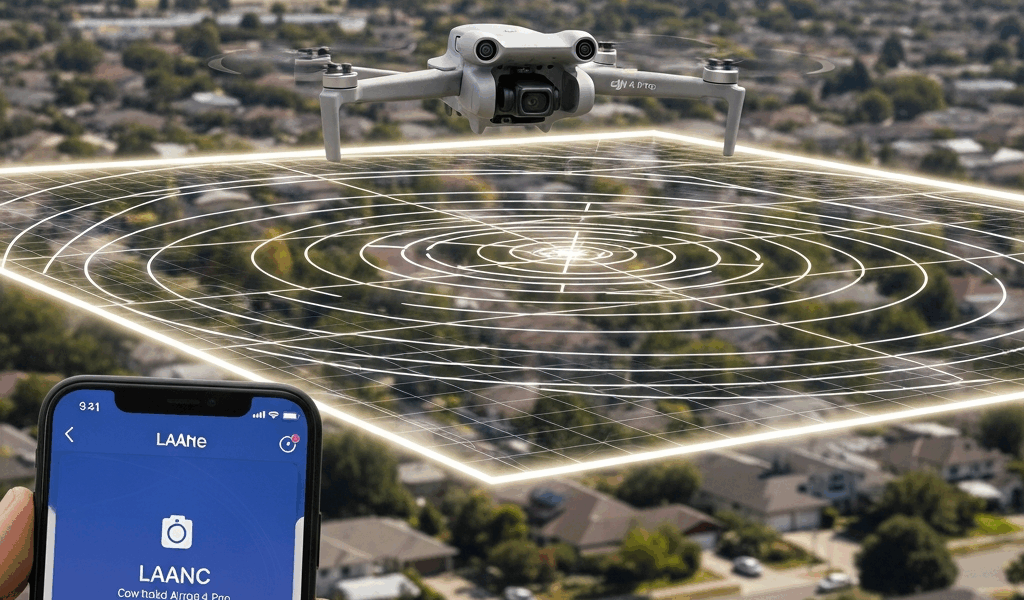
Why Airport Airspace Still Applies to the DJI Mini 4 Pro
Drone rules have gotten complicated with all the misinformation flying around — especially around that 249-gram number people keep throwing out. As someone who learned this lesson the hard way, standing in a parking lot three miles from a regional airport last July, I eventually learned everything there is to know about airspace authorization. Today, I will share it all with you.
But what is the 250-gram exemption, really? In essence, it’s a registration threshold. But it’s much more than that — or rather, it’s been wildly misread as something more than it actually is. I held my DJI Mini 4 Pro that afternoon and genuinely believed the weight put me in the clear. I launched without requesting authorization. Don’t make my mistake.
That weight cutoff affects registration requirements and certain altitude rules. Full stop. It does not touch controlled airspace authorization — not even a little. The airspace around airports belongs to the FAA. Period. Mini 4 Pro, 55-pound cinema rig, it doesn’t matter. Class B, C, D, or E airspace requires permission before you fly.
Here’s what those mean in plain terms:
- Class B — Major metropolitan airports like LAX, Atlanta, Dallas. Usually a 10-mile radius with altitude restrictions pushing 10,000 feet or more. Hobbyist approval here is nearly impossible.
- Class C — Regional hubs with moderate traffic. Think Charlotte Douglas or Austin-Bergstrom. Typical radius runs 5–10 miles. Authorization is possible — but only through a LAANC request.
- Class D — Smaller regional or municipal airports. Usually a 2–4 mile radius. Most approachable situation for Mini 4 Pro operators, honestly.
- Class E — Surface area E or E with floors. Often extends outward from Class D. Also requires authorization for drones — people miss this one constantly.
- Class G — Uncontrolled airspace. The only category where you don’t need FAA pre-approval to launch.
Flying without authorization in controlled airspace carries fines up to $27,500 and potential criminal charges. The FAA has been aggressive about enforcement since 2018 — I’ve read case files where recreational pilots paid $10,000+ settlements just for launching near an airport without LAANC approval. That was a real wake-up call reading those.
How to Check If You Need Authorization Before You Fly
Before you touch the controller, pull out your phone. Two free tools will tell you exactly where you stand: the B4UFLY app or the FAA DroneZone map. So, without further ado, let’s dive in.
I’m apparently a B4UFLY person and it works for me while DroneZone’s interface never quite clicks for my brain. Download B4UFLY, drop a pin at your intended flight location, and it serves up a color-coded grid overlay. Green means Class G airspace — you’re clear. Yellow or red means controlled airspace and you need LAANC authorization before anything leaves the ground.
Each grid square carries a specific ceiling altitude. Some squares auto-approve in seconds through LAANC — Low Altitude Authorization and Notification Capability. Others push you toward manual submission through FAA DroneZone, which can take anywhere from 90 minutes to several days depending on the facility.
That distinction matters enormously. Planning a real estate shoot near an airport this Saturday? Manual FAA DroneZone submission won’t be processed in time. Use Aloft or DroneLink instead — both leverage LAANC and return approvals almost instantly for most pre-coordinated airspace.
DroneZone is the direct FAA portal. It’s clunky for one-off flights — you fill out forms, wait for an email, repeat. Fine for commercial operations with scheduled windows. Not ideal for the Mini 4 Pro pilot who just needs to film one property on a Tuesday afternoon.
Step-by-Step LAANC Authorization Using Aloft or DroneLink
Probably should have opened with this section, honestly. This is the part that stops most Mini 4 Pro owners cold — they know authorization exists but have zero idea what the actual workflow looks like.
I’ll walk you through Aloft (formerly Kittyhawk) because it’s the most beginner-friendly option out there right now:
- Create a free account — Visit Aloft’s website and sign up. You’ll need your name, email, and FAA drone registration number. Find it on your Mini 4 Pro registration document or inside the DJI Fly app under aircraft information.
- Enter your flight details — Input the exact GPS coordinates of your intended takeoff spot. Click a map pin or paste coordinates directly. For the Mini 4 Pro, you’re almost certainly flying below 400 feet AGL, so enter your realistic max altitude — usually 100–200 feet for most shoots.
- Submit the request — Hit submit. Aloft pushes the request to LAANC, which contacts the airport’s traffic management system in real time.
- Receive approval — Most of the time a green “Approved” notification appears within 5–30 seconds. That authorization is tied to that specific grid square and ceiling altitude. Screenshot it or download the PDF — keep it on your phone during the flight.
- Fly with confidence — Launch your Mini 4 Pro. Approvals are typically valid for a specific time window, usually 30 minutes to 2 hours depending on the airport facility.
DroneLink works similarly but with a different interface. It integrates directly with DJI controller software, so approvals sync to the aircraft automatically. Either tool works — pick whichever one feels more natural to you after a few minutes poking around.
Cost? Both are free for recreational flyers. Aloft charges commercial operators, but hobbyists don’t pay a dime. That was true as of late 2024, at least.
What Altitude Limits Mean in Controlled Airspace Grids
This is where most guides gloss over the details and leave you more confused than when you started.
When Aloft or B4UFLY displays a grid square labeled “0 ft” ceiling, that does not mean you can hover at ground level. It means no LAANC authorization exists for that square — at all. Manual submission through FAA DroneZone is your only option, and that takes days. A 0 ft grid is effectively a red light for same-day flying.
Here’s a rough breakdown based on distance from runway:
- 0–1 mile from runway — Usually 0 ft ceiling (manual approval required, expect several days)
- 1–2 miles — 100 ft or manual submission
- 2–3 miles — 100–200 ft auto-approval through LAANC
- 3–5 miles — 200–400 ft auto-approval
- 5+ miles (Class E) — 400 ft or higher, often auto-approved instantly
The Mini 4 Pro can technically climb to 10,000 feet. In controlled airspace near airports, those grid ceilings override the drone’s physical capabilities entirely. Your aircraft enforces them. Exceed the approved altitude and you’re in violation — regardless of whether the drone could go higher without blinking.
What Happens If You Fly Near an Airport Without Authorization
The FAA doesn’t mess around. Enforcement triggers happen three ways:
- ATC radar spotting — Air traffic controllers see unidentified targets near the airport threshold, report it, and FAA investigators follow up. This happens more than people realize.
- Airport security or public report — Someone on the ground sees your drone and contacts TSA or airport operations. Bystanders report drones constantly now.
- Manned aircraft pilots — Pilots report drone sightings to ATC during flight. Creates a documented paper trail immediately.
If the FAA connects that unauthorized flight to your Mini 4 Pro through serial number records tied to your FAA registration, you face civil penalty proceedings. Settlements I’ve seen documented range from $5,000 to $27,500 — the final number depends on breach severity and how well the negotiation goes. Criminal charges are rarer but not theoretical, particularly if a manned aircraft was endangered.
That’s what makes LAANC so endearing to us Mini 4 Pro pilots — it’s a 10-minute process that costs absolutely nothing. There is genuinely no rational reason to skip it. Bookmark Aloft or B4UFLY before your next flight anywhere near an airport. The 10 minutes you spend requesting authorization now is a very different conversation than the one you’d have explaining a $15,000 fine later.

Stay in the loop
Get the latest dronefaaregulations updates delivered to your inbox.