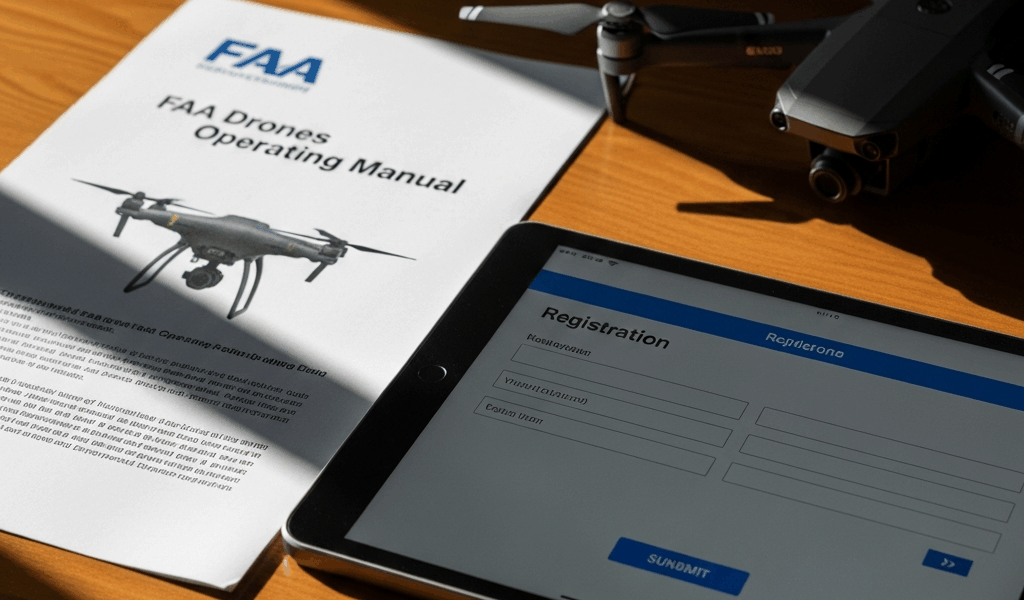
Who Needs to Register and Which Category Applies to You
This article includes affiliate links. We may earn a commission at no extra cost to you.
FAA drone registration has gotten complicated with all the misinformation flying around. So let me cut straight to what actually matters in 2026: before you ask how to register, you need to answer whether you have to register at all.
The weight threshold is 250 grams — roughly what a baseball tips the scale at. Your DJI Air 3? Over that limit. Most Auterion models? Same story. Cross that line and you’re legally required to register before your drone leaves the ground. Doesn’t matter if you’re a weekend hobbyist or a full-time commercial operator. Below 250 grams, you’re exempt — though local airspace rules still apply and line-of-sight requirements don’t disappear just because the FAA gave you a pass on registration.
Here’s where people really trip up, though. Intent. Flying for fun — backyard footage, aerial photography practice, just enjoying the hobby — puts you in the recreational category. The moment money enters the picture, even a single paid gig filming a friend’s wedding, you’re operating under Part 107 commercial rules. I know this firsthand. Registered my first drone as recreational, took a paid wedding shoot three months later, and suddenly realized I was in genuinely illegal territory. The FAA doesn’t grade that on a curve. One recreational account covers multiple drones. Part 107 pilots need each aircraft registered separately. Don’t make my mistake.
Step-by-Step FAA DroneZone Registration Walkthrough
Everything runs through the FAA’s DroneZone platform — faadronezone.faa.gov. That’s it. Third-party registration sites exist, and some look convincing. Ignore them entirely.
So, without further ado, let’s dive in.
- Create your DroneZone account. Hit “Register a New Drone” on the homepage. You’ll enter your email, set a password, and fill in basic personal information. The verification email can take anywhere from twenty minutes to a full 24 hours — I’ve watched people restart the entire process because they didn’t check their spam folder first. Check spam. Wait it out. The link eventually shows up.
- Choose your registration category. Recreational or Part 107. Pick carefully, because switching later means canceling the original registration and starting over. The fee doesn’t carry over either.
- Enter your drone’s details. Manufacturer, model number, serial number. The serial number is the piece most people scramble to find mid-registration. It lives in the drone’s settings menu or printed on the battery label — sometimes both. Have your drone physically in front of you before you start this step.
- Pay the $5 fee. That’s the 2026 recreational rate. Credit cards, debit cards, digital wallets all work in theory. In practice, some fraud filters flag FAA transactions as suspicious — if your card gets declined, call your bank before assuming DroneZone is broken. I spent 45 minutes troubleshooting a website that wasn’t actually broken. The bank had flagged it. One phone call fixed everything.
- Download your certificate immediately. A PDF appears after payment clears. Your registration number lives on that document. Save it in at least two places — email yourself a copy, screenshot the number, whatever works. Losing that number means reapplying. Nobody wants that.
Ten minutes, start to finish — at least if you have your serial number ready before you begin. Most delays trace back to that one detail.
Where to Put Your FAA Registration Number on Your Drone
Probably should have opened with this section, honestly, because this is where new pilots consistently fumble.
Your registration number needs to appear on the drone’s exterior — visible without removing or disassembling any component. It doesn’t need to be elegant. It needs to be readable. Something like “FAA-2-ABC123D” — roughly ten characters — placed somewhere an inspector can see it without hunting around.
The battery compartment counts as exterior, despite what some forum arguments will tell you. I’ve seen enforcement photos where the number sat inside the battery door and the pilot passed inspection without issue. The FAA’s position is clear on this one. Standard placement is the fuselage near the battery door. Underside of the body works too. Landing gear is technically compliant if the number’s readable, though it’s not the cleanest solution.
Waterproof vinyl labels are the easiest method — print your number on adhesive label stock, seal it with clear tape if you’re flying anywhere near moisture. Permanent marker directly on the drone body works fine too. Black ink on light-colored plastic reads well from three feet away. Whatever approach you take, the FAA cares about exactly one thing: an inspector shouldn’t need to search for it.
Registration Renewal and What Happens If It Expires
Three years. That’s your registration window from the issue date. After that, it’s expired — and the FAA sends zero reminder emails. You’re responsible for tracking the date yourself.
Flying on an expired registration is technically illegal. Fines can reach $27,500 in recreational scenarios, though enforcement isn’t uniform. The risk is real regardless of how inconsistently it gets applied.
Renewal opens up 30 days before expiration. Log back into DroneZone, update any information that’s changed since your last registration, pay the $5 fee again, and download the new certificate. Your registration number stays identical — no new number gets issued. The expiration date simply pushes forward another three years.
Discovered you’ve been flying on an expired registration? Land immediately. Log into DroneZone and renew as fast as possible. Prompt renewal generally keeps enforcement consequences off the table, but you’re technically in violation until the new certificate generates. There’s no grace period written into the rules.
Common Registration Errors and How to Fix Them
Things go sideways sometimes. Here’s how to get unstuck.
Wrong category selected. Registered recreational but need Part 107 coverage — cancel the current registration inside DroneZone (this removes it from active status, not permanently from existence) and open a fresh Part 107 application. You’ll end up with two separate registration numbers. That’s normal and correct.
Name or address mismatch. Certificate reads “James Smith,” legal ID says “James Robert Smith.” Update your account profile in DroneZone before your next flight. The name on your certificate should match your government-issued ID exactly. Address changes work the same way — account settings, not a new registration.
Payment declined repeatedly. Call your bank or card issuer directly. Ask specifically whether they’re blocking FAA or government agency transactions. Some fraud systems flag these automatically. Once your bank clears the block, retry in DroneZone. The website almost certainly isn’t the problem.
Certificate never arrived by email. Wait a full 24 hours first. Check spam. If two days pass without anything, log back into DroneZone and click “Resend Certificate.” The PDF typically arrives within an hour after that.
Drone crashed or replaced. If the serial number is still valid and the airframe category stayed the same, you don’t need to re-register. Re-register only if the drone was destroyed beyond repair or you switched to a different model entirely. A serial number update inside your existing account handles hardware swaps within the same registration category.
I’m apparently someone who learns things the hard way — wrong category, blocked payment, missed certificate email, I’ve hit almost all of these — and DroneZone’s self-service fixes work faster than waiting on FAA support. The support team responds eventually, but “eventually” sometimes means several business days. Fix it yourself first.

Stay in the loop
Get the latest dronefaaregulations updates delivered to your inbox.